Plugins add features and capabilities to Family Historian (version 5 onwards), and can be freely downloaded by Family Historian users from this store. There are currently 128 plugins available for download.

  • Click Plugins to view all plugins.
  • Click on any plugin name to view more details about it, and to download it.
  • Warning: Take care only to install plugins that are compatible with your version of Family Historian.
  • How do I find the Plugins I need?

Featured Plugins

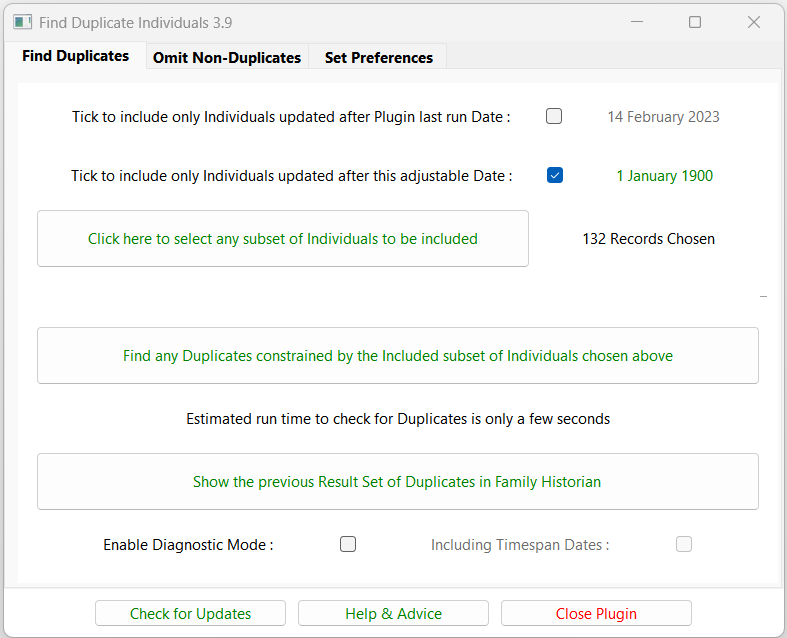
Find Duplicate Individuals

V3.9

Finds potentially duplicated Individual records by comparing the Names and key Events of selected Individuals and their immediate Relations. See the Help & Advice for details. For further support please post in the Family Historian User Group forums or Family Historian at Groups.io email where the plugin author will answer your questions which can be supplemented with screenshots if necessary.

Family Historian Version(s): V5 V6 V7

Search All Possible Names

V1.6

Search for individuals by specifying a given name, surname or both. A table of all matching individuals is returned with links to each record.

  • All recorded names for each person are checked.
  • With women, both maiden names and husbands’ surnames are checked (unless the family record is flagged as ‘Unmarried Couple’ or ‘Never Married’). Matching a woman’s husband’s surname is done on the assumption that his surname is likely to be her married name.
  • Leave both fields blank to get a complete list of all names from your Project. This replicates the TMG all names list.

Family Historian Version(s): V5 V6 V7

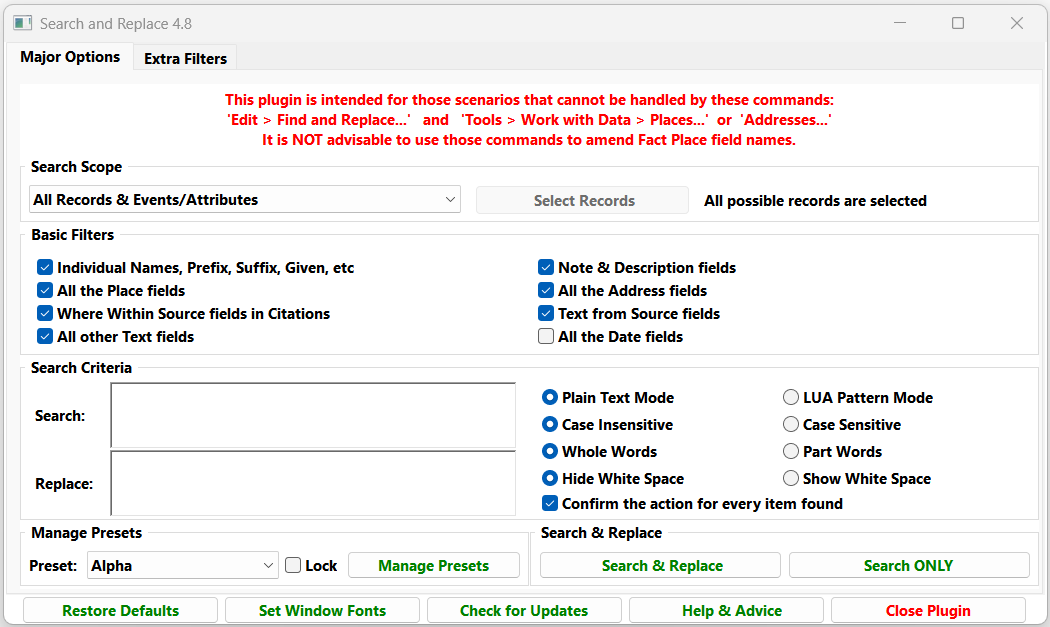
Search and Replace

V4.1

Searches for any text, age, or date values within the current project, and allows them to be replaced by new values, with an optional confirmation at each stage. On completion, all processed values are listed in a Result Set with links back to the record fields. Supports regular expression style Lua pattern matching. See the Help & Advice pages for full details. This plugin is intended for those scenarios that cannot be handled by these commands: Edit > Find and Replace... and Tools > Work with Data > Places... or Addresses... However, do NOT use Edit > Find and Replace... to change any Place field names as it will upset your Place records. For further support please post in the Family Historian User Group forums or Family Historian at Groups.io email where the plugin author will answer your questions which can be supplemented with screenshots if necessary.

Family Historian Version(s): V5 V6 V7

Search and Return Result Set

V1.8

Search for a specified word or phrase in all text fields in the current project, with options to narrow the scope of the search. The matching fields are listed in a table in the Query Window result set, with links back to each context of use (double-click on any Item to view it in the Property Box).

Family Historian Version(s): V5 V6 V7

Recent Updates for Plugins

Move Note URL to Rich Text Web Link

V1.3

Convert any Note or Text From Source fields with an unformatted URL and optional codes into the Rich Text active Web Link <web="URL"> format. On completion, the plugin will optionally list all the converted URL in a Result Set. The plugin handles the http://, https://, and ftp:// URL protocol formats with safe, reserved, unreserved, and most unsafe characters. This is useful for GEDCOM exported from FTM 2019 where Source Citations have Web address URL held in _LINK tags that are imported by FH into local Note fields. The plugin will convert them to Rich Text active Web Link format. Another use is for handling custom attribute facts with auto-created local Note text containing URL as explained below. The Tools > Fact Types... command must be used to define a custom attribute in which the Fact Definition dialogue, Advanced... button, Auto-Create Note: field, specifies a URL with a format such as: See https://www.familysearch.org/tree/person/details/{value}/ "{individual's} {value} FamilySearch" page. When the custom attribute is added to an Individual, that text is automatically inserted into the local Note field and the user enters the attribute value, which is the unique part of the website URL. The plugin converts that URL and the {value} and {individual's} codes to the Rich Text active Web Link format such as: See <web="https://www.familysearch.org/tree/person/details/LH3-6Y/","John Smith's LH3-6Y FamilySearch"> page. That is displayed in the Note text as: See John Smith's LH3-6Y FamilySearch page. The requirements are:

  • The Note or Text From Source fields need valid URL that start with https:// or http:// or ftp://.
  • Each URL may optionally be followed by one space and some display text enclosed in "string quotes".
  • Any individual attribute local Note may include the code {value} to be replaced by the fact attribute value. If there is a {value} code, but no fact attribute value, then the Note is not converted.
  • Any individual fact local Note may include the codes {individual} and {individual's} to be replaced by the record Name.
  • There may be more than one of any of the above.
For further support please post in the Family Historian User Group forums or Family Historian at Groups.io email where the plugin author will answer your questions which can be supplemented with screenshots if necessary.

Family Historian Version(s): V7

Add Notes

V1.6

The Add Notes plugin helps you quickly link notes to multiple records in your Family Historian project. Instead of manually adding notes one by one, you can: [su_list icon="icon: check-square-o"]

  • Bulk link existing notes to many records at once
  • Create tailored notes from templates for each target record
  • View and edit notes and templates directly within the plugin
[/su_list]

Family Historian Version(s): V7

Backup and Restore Family Historian Settings via Windows

V3.0

This plugin provides a simple and convenient method for backing up and restoring Family Historian custom settings and features, such as Plugins, Custom Queries, Fact Sets, Language Packs, etc, using Windows scripts for file management.  This gives a faster backup than using traditional plugin methods, and can be used either for restoring to the original PC or transferring all customisations to a new or additional PC. No prior knowledge of Windows scripting is required to use the plugin, as all menu options are presented in familiar everyday language.  However, they provide a template for technically-minded users to develop more sophisticated backup routines, such as single-click backups activated from a desktop shortcut, or even regular unattended backups that run automatically in the background to a defined schedule. The plugin is designed for ease of use, with a minimum of configuration options in a simple and streamlined interface.  Family Historian 7 custom fonts and zoom levels are fully supported, with no additional configuration required.

Family Historian Version(s): V5 V6 V7

Ancestry Synchronization

V2.7

Manages a process whereby an extract of the Family Historian project is kept synchronized with Ancestry to give continuity in hint generation, with a simple optional process for completely removing any reference to living or other private individuals. Updating an Ancestry tree via a new GEDCOM file resets the record of which hints have been processed. However, if the update is carried out via an intermediate application that synchronizes with Ancestry, the hint history is fully preserved between updates. This plugin links to RootsMagic 11 or later to ensure that the RootsMagic extract is an exact copy of the relevant facts in Family Historian. This extract is then uploaded to Ancestry using the TreeShare function within RootMagic. The full version of RootsMagic is required to keep the tree updated and preserve your hint history, but the free Essentials version can be used for a one-off upload. Ancestry no longer support linking with RootsMagic versions 9 and 10. The plugin will continue to synchronise with these older applications, but the subsequent Ancestry upload will no longer function. Note that there is by design no facility to transfer new information from Ancestry hints or other changes back to Family Historian. It is a one-way transfer of data, and all updates are made in Family Historian to prevent any project corruption arising from incompatibilities between the three applications.

Family Historian Version(s): V7

Recent Updates for Language Packs

English (ENG RPRT) Mike Tate

V1.2 English Report Words
Translate some words in reports such as Spouse, Husband, Wife to Partner. Further translations are easily added in Tools > Language Packs... using Edit... Miscellaneous. Handles all Date formats in reports and diagrams. Supports the {a/an value} for attributes in reports. The default is to use 'an' for attributes starting with a vowel, but can be overridden in Tools > Language Packs... using Edit... Attribute Values for the Special Case ARTICLE. For further support please post in the Family Historian User Group forums or Family Historian at Groups.io email where the plugin author will answer your questions which can be supplemented with screenshots if necessary.

Romanian (RON) Andrei Jipa

V1.0 RON v1.0
Basic Romanian language pack for Family Historian.

English (ENG) Calico Pie

V1.1 English
This language pack is intended to be used by anyone who records their data in a language other than English, but may sometimes want to translate it into English. Users will need to add to the translation tables, to translate terms in their own language into English; but the pack should provide at the very least, a good starting-point.

Portuguese (POR) Miguel Centeno

V1.2 Portuguese
This language pack is designed to be used to translate an English language project into Portuguese, and also to correctly render a Portuguese language project into Portuguese. If you are using it with a Portuguese language project, for best results, be sure to specify that the project language is Portuguese (in the Header record - which is accessible from the 'Special Records' submenu of the View menu). The language pack could be extended or modified to support translating other project languages into Portuguese, if required. This language pack contains language variants of fact types (fact definitions), as well as language variants of text schemes for diagrams.