
Each exported labelled Note can have its Label customised on these two tabs. Whether the labelled Note goes before or after existing Note text can also be chosen. A few Labels apply to record titles and other cases where the before/after choice is not relevant.
These settings apply identically to every GEDCOM Destination but vary for each FH version.

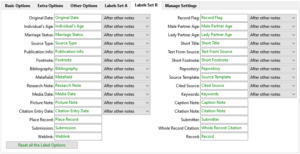
The initial settings can be restored by using the Reset all the Label Options button.
See the Basic Options tab, Extra Options tab, Other Options tab, GEDCOM Destination advice and Frequently Asked Questions for further details.
Return to the Export Gedcom File main help page.
Help content on this page is owned and provided by Mike Tate, the plugin's author, Calico Pie takes no responsibility for its content.