
These other export Rules offer alternative Action options for advanced users. The set of Rules may vary for each FH version.
These settings are remembered independently for the (+) Full Data and (-) Brief Data option of each GEDCOM Destination.
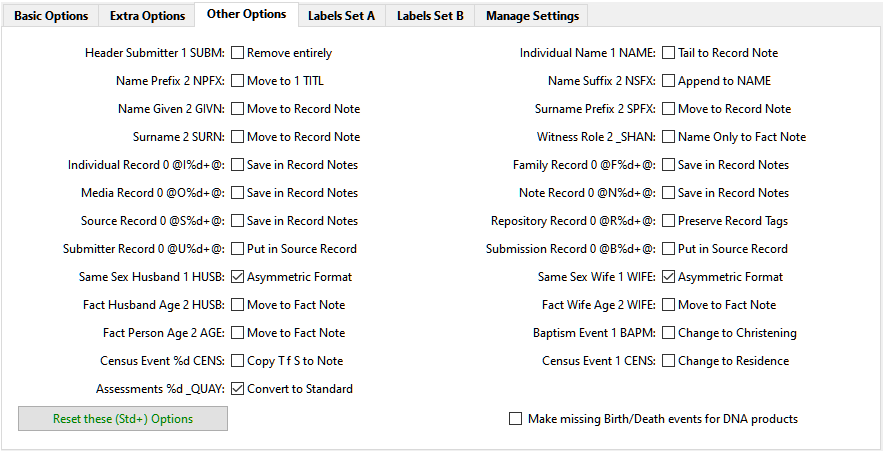
Each Rule choice gives its Title with the custom tag involved, and offers the Action available.
Tags with %u allow an upper case letter in that position, and those with %d allow any digit.
The tags starting with %d can apply to any level digit from 1 – 9 unless the name starts with an underscore ( _ ) then level 1 is excluded.
The initial default settings can be restored by using the Reset these … Options button, which only affects the settings shown.
The Move to Record Note and Save in Record Note options are legacy settings that can usually be ignored.
The Same Sex Husband/Wife: Asymmetric Format is recommended for all products except FH V5 and FH V6.
The Baptism Event: Change to Christening option is for products that do not recognise Baptism events.
The Census Event: Change to Residence option helps some products like Ancestry to match Census records.
FH V7 introduced custom Citation Assessments so the Assessments: Convert to Standard option makes them GEDCOM compatible.
The final tick option allows missing Birth &/or Death events to be synthesised from other facts.
See the Basic Options tab, Extra Options tab, Labels Set A/B tabs, GEDCOM Destination advice and Frequently Asked Questions for further details.
Return to the Export Gedcom File main help page.
Plugin Export Gedcom File
Help content on this page is owned and provided by Mike Tate, the plugin's author, Calico Pie takes no responsibility for its content.