
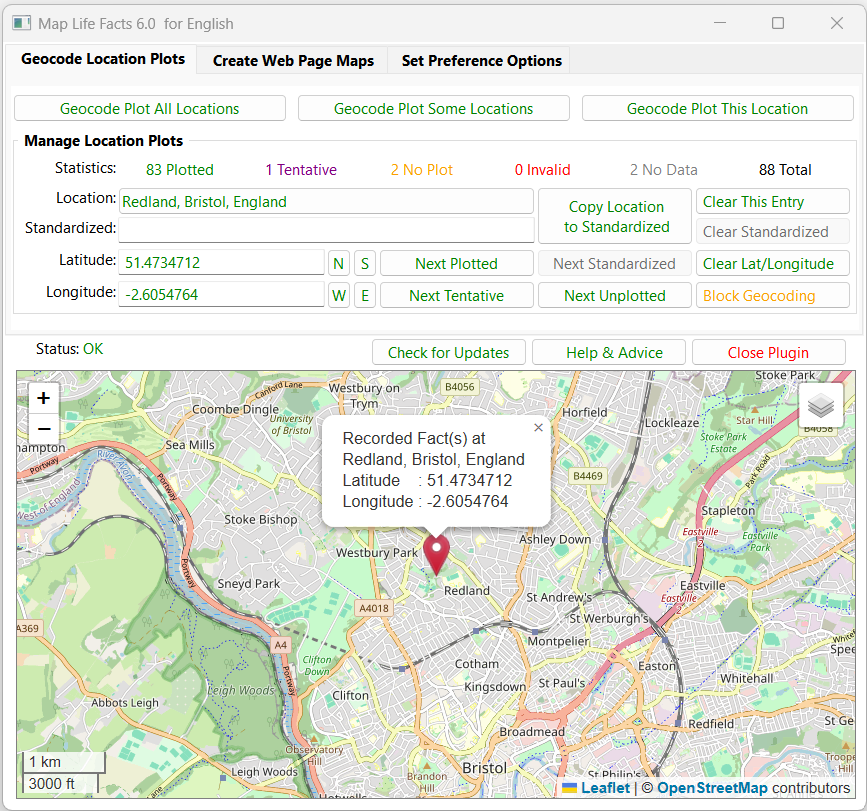
A mapping tool that can sync with Place records and create maps on web pages that display geocoded locations for each person’s life facts.
Mapped data may be saved in a Plugin Data file, or as part of your Project GEDCOM, in Source, Repository or Place records.
Place and Address fields are supported. Maps can be filtered on Living & Private flags. The map files can integrate with FH generated web pages.
See the Help & Advice for details. This plugin is not supported by Family Historian Version 8.
For further support please post in the Family Historian User Group forums or Family Historian at Groups.io email where the plugin author will answer your questions which can be supplemented with screenshots if necessary.
- Family Historian Version(s): V5 V6 V7 No
- Plugin Type: Standard
- Written by Mike Tate
- View Source Code
- Downloaded 4,621 times
- See Help page for more information
Version History
- V6.1: Library 4.1; Check for Updates button; Centre windows on FH; Fix Language Pack tag; Inhibit FH V8;
- V6.0: Remove Bing Maps; Add Google Maps to Leaflet panes; Update Leaflet version;
New pin colour options & scale size; Filter manual Lat/Long values; Add Check for Updates;
Inhibit close on Enter/Return/Esc keys; Fix Delete All Maps; Alter google.co.uk to google.com; - V5.4: Copy Location to Standardized button never changes Lat/Long or Status;
Geocoding errors are now reported more effectively by using luacom.config; - V5.3: Bing Maps geocoder and map display supported; Geoapify geocoder added;
Google Maps allowed for Web Page Maps; Map Pane legend sizing for screen resolution; - V5.2: Deprecate faulty Google Maps display mode; Remove Leaflet Maps ‘NLS Historic UK’ mode;
- V5.1: Use library V3.3 with File System Objects; Cater for foreign languages;
Cater for ‘Improve Website or CD DVD HTML’ plugin Tree Diagrams tab ‘See also’ section; - V5.0: Purge any Location blank comma parts that upset Google Geocoder;
Modified the Smart Geocoding to be case-insensitive and focussed on region-specific codes;
If geocode plot Not Found then prune leading Location part and try again twice;
Use try{} & finally{} in Google & Leaflet JavaScript to avoid error messages; - V4.9: Revised help splash page; Better compatibility with FH user interface;
Reverse Display Order option for Place List; Google Maps V3.45 for IE compatibility;
Check plugin version monthly; Aggressive memory management; Fix Leaflets Maps Pan issue; - V4.8: Fix help splash pages for missing Google API key;
- V4.7: Updated library functions; FH V7 Lua 3.5 IUP 3.28 compatible;
Fix problem swapping Locations From & Database In when GEDCOM records involved;
Sample city plots based on Region Bias; Updated Leaflet map versions;
Removed Mapbox Streets from Leaflet as not now free; - V4.6: Allow unreserved URI characters including hyphen, dot & tilde in personal API Key;
Fix a problem with iup.Tree leaf Title attribute truncating Place names to 254 characters;
Fix a problem with Google Maps not rubbing out map markers correctly.
Update to latest library version; - V4.5: Fix a problem with Google Maps scripts, and improve initialisation;
- V4.4: Fix a problem with detecting old format map files;
- V4.3: The Leaflet Maps mode alternative to Google Maps is supported.Plot Markers can be added & dragged to set Latitude & Longitude values.Place List entries grouped by first alphanumeric character disregarding leading symbols.
- V4.2: The Google Maps mode supports the API Key needed to unlock its services.Emigration and Immigration facts now fully implement both their Place names.All symbols that might occur in Place or Address fields are now handled correctly.Windows XP and Vista are barred as now incompatible with Google Maps.
- V4.1: Fix UTF8 accented chars in drop-lists; Fix problem when Plugin Window is minimised and closed.
- V4.0: Ignores location text enclosed in [[ brackets ]], plus fix for Erase Addr ~ Place Database.
- V3.9: Improves Geocoder mapping of place names with a hyphen such as Stoke–upon–Trent, ensures use of best stable version of Google Maps API, and fixes some minor bugs.
- V3.8: Handles new Geocoder response of Unknown Error that indicates a server problem, and enforces Geocoder version 3.18 in support of Windows XP IE v8.
- V3.7: Cancels workaround for Control Panel custom Decimal symbol as now corrected by FH V6.0.2. CD/Website map page style more closely matches FH CD/Website fhstyle.css and user customisations. CD/Website map page Plots optionally exclude any Facts not listed in FH CD/Website pages.
- V3.6: Supports Control Panel customisation of Decimal symbol in Lat/Longitude to be dot (.) or comma (,).
- V3.5: Various database and user interface problems fixed.
- V3.4: Various Place Records related problems fixed.
- V3.3: Supports FH V6 IUP 3.11.2 Unicode & Place Records, revised GUI library, Emigration/Immigration To/From _PLAC, geocoding preference to Lat/Longitude, and fix IUP Tooltips in XP.
- V3.2: Revised the Address…Place sub-options to retain all entries, and new Database Management tab Options.
- V3.1: Speed-up for large numbers of Locations, fixed Delete key bug in Substitute, Latitude & Longitude fields, and four new From Location: Address…Place sub-options.
- V3.0: Force all dialogue backgrounds to white, and make editing Substitute, Latitude & Longitude more responsive.
- V2.9: Optionally auto-detects previously edited Manual Locations, also allows Geocode Plot/Map All/Some to escape at Quota Warning message.
- V2.8: New Manual statistics class of Location, revised Geocode Plot All Locations button, new Geocode Plot Some Locations button, revised Next Plotted / Uplotted, etc buttons, plus other small changes.
- V2.7: Translates any delimited Country/State/Chapman/County Code into full name before submitting to Geocoder, plus other minor updates.
- V2.6: Fixes Not enough memory for big _nameindex.html, sets popup quota warning on all Plot/Map buttons, plus other minor updates.
- V2.5: Corrects missing web page links when no See also section, and adds popup quota warning about exceeding 2,500 plots per 24 hours.
- V2.4: Checks map file belongs to chosen Individual, adds Region Bias Code option, uses bell blob for newline.
- V2.3: Improved Maps & GUI, default Zoom only set on Preferences tab, multi-plot maps on Create Maps tab, minor bug fixes.
- V2.2: Redesigned GUI, colour coded tree lists & statistics, zoom set from Google Map, better map Markers, more bug fixes & code revisions.
- V2.1: Loads faster, resizeable main GUI, trees replace drop-down lists, better tool-tips, bigger Google Map pane, bug fixes & code revisions.
- V2.0: New GUI with tabs, progress bars, and embedded HTML Google Map, plus Google Geocoder API, bug fixes & code revisions.
- V1.1: Improved version with fhSleep(), Interface Font option, and Knowledge Base Help.
- V1.0: Initial version using HTML Application (HTA) for Google Maps Geocoder Service.
Works really well.
I have a lot of my family being born, living, etc. in portsea. The plug-in shows this as being in Australia rather than UK but I can’t quite see how to change the default. A few more instructions on how to do that would be helpful.
Regards, Dick Thomas
Ideally, the location should be defined as Portsea Island, Hampshire, England so the geocoder is not confused.
Otherwise, ensure the Set Preference Options > Location Plot Options > Region Bias Code is ‘uk United Kingdom’.
Excellent Plugin.
Took a few minutes of messing about to understand how it works. Could do with a set of beginner instructions at launch. Apart from that works very well, to the limitations of google maps anyway
Remember to use the Help & Advice button to checkout the online pages. If you have specific suggestions for better advice, then please post them in the FHUG Forum > Plugin Technical Support & Development.
Hi Mike,
I am using OS maps, principally because they are more detailed then Google, Bing etc. and I can find locations such as farms listed there.
OS maps use Leaflet.js – can I use the plugin with OS maps, and if so how?
Peter, I would prefer you asked that kind of question in the FHUG Forum where other interested users might join in.
Maybe I could update the plugin to support OS Maps but they are not a ready-made feature from Leaflet Maps.
Also, it appears that users would have to obtain a free API Key from OS just like users do for Bing and Google.
Mike, you’ve done it again! This plug-in is awesome. I was struggling to add location geo codes to my place records by hand through FH, and was getting frustrated because FH would automatically change the geo code (usually the LONG) after I add a precise location. I couldn’t figure out why the heck it was changing my geo codes… so I gave up. Anyway, I later saw a post about your plug-in and I just had to try it. I must say, it is AWESOME! Calico Pie should just incorporate your plug-in and get rid of whatever they’re using, because it just is not reliable nor is it accurate. Thank you so much for taking the time to make this and especially to share it with everyone! You are AWESOME! And I hope you have a Merry Christmas!
To prevent FH from changing geocodes, open Tools > Preferences > Map Window and tick Block Refresh for Non-tentative Geocodes.