
This plugin examines the project Media Records to identify records that are either full duplicates of each other (same file and matching fields), or where the file names differ but file contents are identical. It provides a number of additional facilities for users of Family Historian 7 compared with the earlier Check for Possible Duplicate Media plugin:
- Support for media files with Unicode names or paths.
- Support for media files of any size, such as large video files.
- Support for multiple files in the same Media Record.
- Support for very long file names.
- A more detailed output report.
- Optional automatic merging of duplicate Media Records.
- Very much faster operation, which is a particular benefit for larger projects.
A typical output from the plugin is shown below, using a project where the Media Records are in need of some maintenance:
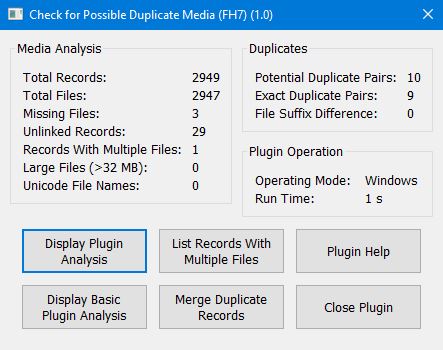
The Media Analysis frame reports the plugin’s analysis of the project Media Records:
Missing Files are broken file links in Media Records where the linked file is not in the location specified. Use Tools > External File Links… from the main Family Historian menu to locate and correct these records.
Unlinked Records are Media Records that exist in isolation and are not linked to another record, such as a Source or Individual. View the records in the Records Window and click on the heading to the Links column to group these records together in the listing.
Records With Multiple Files is a new Family Historian 7 / GEDCOM 5.5.1 feature that allows a single Media Record to contain multiple files, such as individual page images of a multi-page pdf document. It is not well supported in the current version of Family Historian, so it is possible that these records have been created accidentally, for example as a side effect of a merge process.
The Duplicates frame reports on actual and potential duplicate Media Records:
Potential Duplicate Pairs are records that contain files with different names or paths, but identical contents. These may be deliberate, such as where multiple copies of the same file are stored in different locations, or accidental and in need of rationalising.
Exact Duplicate Pairs are records that contain exactly the same file and all other record details match, such as Title and Keywords. They can be merged automatically if required.
File Suffix Difference is a specific scenario that could arise in earlier versions of Family Historian 7 whereby media imported from another application could result in duplicated Media Records and files that differed only by a numerical suffix in parentheses at the end of the name. This bug was fixed some time ago, but such records may still be present in files imported prior to the fix, and can be merged automatically by the plugin if required.
The Plugin Operation frame reports on technical aspects of the plugin operation, and are purely for information:
Operating Mode is usually displayed as Windows, but where the user’s system does not support the more advanced Windows tools used for determining file equivalence (for example, when used under WINE/Crossover), this changes to Lua MD5. Plugin operation may be slightly slower than in a purely Windows environment, but all the plugin features are supported under emulators. Note however that Emulator Compatibility Mode must be selected under Tools > Preferences… > Advanced… whenever the plugin is run inside an emulator.
The plugin window buttons provide the various reporting options:
Display Plugin Analysis opens a detailed listing of potential duplicate records. Each row represents a pairs of records where the attached files have the same content, and the table lists the relevant Media Records, the details of the files that may be duplicated, and the type of match:
- Duplicate Record – each record is linked to the same file, and all record fields match.
- Records Differ – file contents match, but record fields are different.
- Duplicate File – two copies of the same file in the same record.
- File Suffix – Media folder filenames differ only by a numerical suffix, and other record fields match.
Display Basic Plugin Analysis is similar to the full analysis described above, but omits the file details and may be more suitable for users with smaller displays, as the full analysis table can be rather wide.
List Records With Multiple Files does just that – listing any Media Records that contain more than one attached file.
Merge Duplicate Records merges all pairs of records described as Duplicate Record above – i.e. identical records. If there are also record pairs that differ only by Media folder file suffix, the plugin will ask whether these records should also be merged. The superfluous Media Record with the file suffix is effectively deleted by merging with the master record (without the suffix), but not the attached file. These redundant files can be located with the Check for Unlinked Media plugin, which can also delete the files if required.
Plugin Check for Possible Duplicate Media (FH7)
Help content on this page is owned and provided by Mark Draper, the plugin's author, Calico Pie takes no responsibility for its content.