
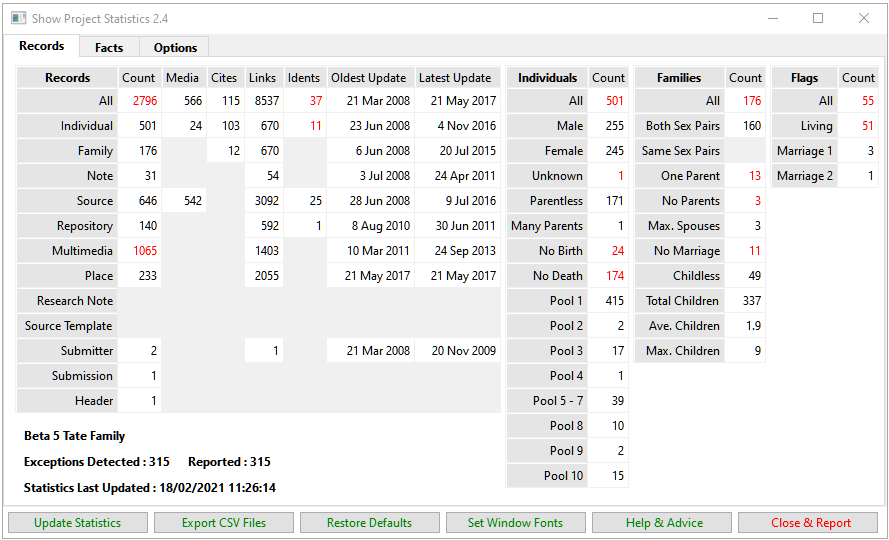
This plugin displays a summary of statistics for the Project and reports any exceptional data. When the plugin version changes a new statistics grid must be created.
See Frequently Asked Questions for advice.
The details are presented on three tabs:
- Records tab statistics grid
- Facts tab statistics grid
- Options tab report settings
The Update Statistics button creates the statistics, then sets the Exceptions Detected and Reported counts and the Statistics Last Updated date-time-stamp.
The Export CSV Files button exports each matrix of statistics as a Comma Separated Values (CSV) file in the project Public folder. These files can be opened with Microsoft Office Excel or OpenOffice Calc or any other spreadsheet program.
Use the Restore Defaults button to clear all statistics, reset all options, and restore installation defaults for all window positions and sizes.
Use the Set Window Fonts button to Set Window Fonts and Colours for the user interface.
Click Help & Advice to display these help pages.
The Close & Report button closes the display and presents a Result Set Exceptions Report.
Use [ X ] Close button to quit without a Result Set and without saving options.
Plugin Show Project Statistics
Help content on this page is owned and provided by Mike Tate, the plugin's author, Calico Pie takes no responsibility for its content.