
Choose which Result Set Exception Reports to include by ticking or clearing the check boxes in two columns. Reports may be included or excluded and the red statistics marks updated without using the Update Statistics button.
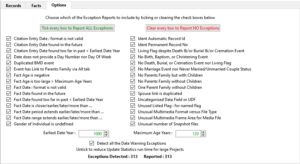
Adjust Earliest Date Year to report any Date that is too far in the past. Adjust Maximum Age Years to report any Age that is too large.
Disabling the detection of Date Warning Exceptions should reduce the Update Statistics run time for very large Projects. This affects all the Citation Entry Date and Fact Date reports except Citation Entry/Fact Date found in the future/too far in past.
These latter options will be applied the next time Update Statistics is used.
The Exceptions Detected count is the total and the Reported count is only those enabled by the ticked options.
Return to the Show Project Statistics main help page.
Plugin Show Project Statistics
Help content on this page is owned and provided by Mike Tate, the plugin's author, Calico Pie takes no responsibility for its content.