
The plugin that drives the synchronization process is deliberately designed to have only limited user-defined options, in order to ensure that all its output GEDCOM files are configured identically.
The current version of the plugin has a total of nine user-definable options, which are saved as project level options to enable different options in each Family Historian project if required.
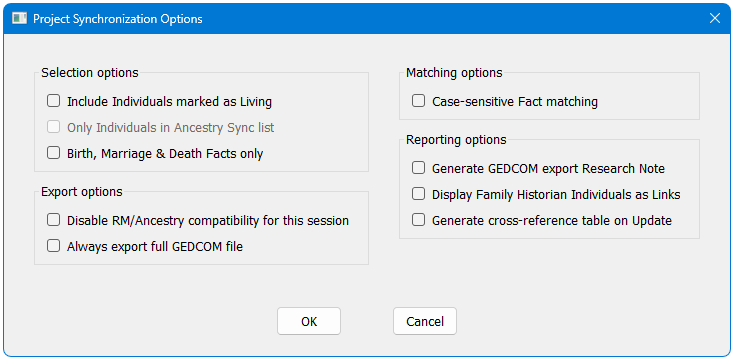
Selection Options
- By default, Individuals marked as “Living” are excluded, but an option is provided to include them in the export and update process (default = off). If “Living” Individuals are included, the Living flag is copied to RootsMagic and subsequently uploaded to Ancestry, so public viewing of living people’s details is still suppressed.
- An option is provided to limit the GEDCOM export and RootsMagic comparison to a defined list of individuals and their families. This can be useful for creating an Ancestry tree from an extract of your master project. With this option selected, any individual who is NOT in a Named List called Ancestry Sync is omitted, along with any family reference. It is not currently possible to create a Family Historian list from a plugin, so you will need to create this list manually. List membership is best managed via a Query or Queries – consult the Family Historian program help if you are not familiar with this topic.
- The following protocol is maintained for determining which Individuals are included in the GEDCOM export and RootsMagic comparisons:
- Individuals marked as Private are always excluded, along with any Family Records where they are a spouse.
- Individuals marked as Living are excluded unless the Include Individuals marked as Living option is selected.
- When the Only Individuals in Ancestry Sync List option is selected, Individual records that are on the list are included, provided that they are not excluded by either of the preceding options.
- The plugin is provided with a default list of standard facts that are exported to RootsMagic and Ancestry, such as birth, baptism, census (residence), marriage, death, burial, probate, occupation, etc. This list can be changed readily by a simple modification to the plugin code, even if you have no previous experience of writing or editing plugins. Select “More>>” from the Plugins Window to show the hidden options, select the plugin, and click on “Edit…”. Directions for which lines to edit are given in the plugin script. Note that only Individual Facts should be added to the list, not Family Facts, due to significant limitations in how both TreeShare and Ancestry manage the recording and updating of family facts. For users who wish to limit the Ancestry tree to basic birth, marriage and death details, a plugin option is provided that makes this change without having to edit the script file.
Export Options
- Users may find this plugin a convenient method for producing a sanitized extract of their project for more general use, rather than just export to Ancestry. To facilitate this, there is an option to disable features of the export that are designed to work within limitations in either RootsMagic or Ancestry:
- All names are exported exactly as entered, not forced to a Given – Surname order.
- Census Facts are maintained as Census, not converted to Residence.
- If the linked RootsMagic file has not been updated since the last full update, the GEDCOM export defaults to just a subset of changed Family Historian records (plus sufficient additional records to facilitate an accurate merge) in order to reduce merging times and prevent unnecessarily high record identifiers. Users may override this and always export a full GEDCOM file if preferred.
Matching Options
- By default, all fact comparisons between Family Historian and RootsMagic are case-insensitive, to allow for any minor capitalisation differences that RootsMagic record merging overlooks. An option is provided to enforce strict case-sensitive matching to ensure that the Ancestry tree is a perfect copy of the corresponding data in Family Historian.
Reporting Options
- An optional Research Note reports the detailed results of the GEDCOM export – how many individuals and families were exported, the export file name, and an explanation of why omitted Individual Records were not exported. Note that Family Records are excluded if either of the spouse partners is excluded and there are no children linked to the family. If there are linked children, the family are excluded only if both parents are either excluded or missing from the database, as Ancestry does not support families with no known parents.
- The Research Note outputs can be configured with Individuals listed as either plain text or hyperlinked text, according to personal preference.
- If you have a lot of updates to make, generating a cross-reference table can be useful, where the Family Historian and RootsMagic record numbers are tabulated for each Individual present in either app. This is displayed in the Query Window when the plugin closes.
RootsMagic does not have an “undo” facility to reverse changes made during synchronization. Early versions of the plugin had an option to create a backup of the RootsMagic file every time the plugin was run. This has now been changed, so that a backup is created automatically, but only if changes are made to the file. Just running the Compare operation does not write to the RootsMagic file, so no backup is created (unless an immediate update from a changed Sex is selected).
Plugin Ancestry Synchronization
Help content on this page is owned and provided by Mark Draper, the plugin's author, Calico Pie takes no responsibility for its content.