
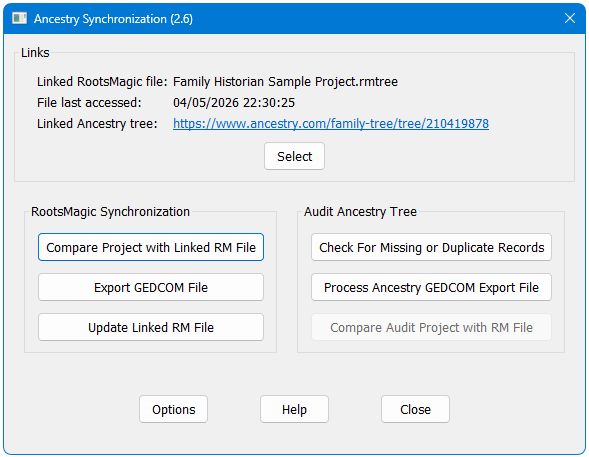
Manages a process whereby an extract of the Family Historian project is kept synchronized with Ancestry to give continuity in hint generation, with a simple optional process for completely removing any reference to living or other private individuals.
Updating an Ancestry tree via a new GEDCOM file resets the record of which hints have been processed. However, if the update is carried out via an intermediate application that synchronizes with Ancestry, the hint history is fully preserved between updates.
This plugin links to RootsMagic 11 or later to ensure that the RootsMagic extract is an exact copy of the relevant facts in Family Historian. This extract is then uploaded to Ancestry using the TreeShare function within RootMagic. The full version of RootsMagic is required to keep the tree updated and preserve your hint history, but the free Essentials version can be used for a one-off upload. Ancestry no longer support linking with RootsMagic versions 9 and 10. The plugin will continue to synchronise with these older applications, but the subsequent Ancestry upload will no longer function.
Note that there is by design no facility to transfer new information from Ancestry hints or other changes back to Family Historian. It is a one-way transfer of data, and all updates are made in Family Historian to prevent any project corruption arising from incompatibilities between the three applications.
Download Ancestry Synchronization V2.7
- Family Historian Version(s): V7
- Plugin Type: Standard
- Written by Mark Draper
- View Source Code
- Downloaded 258 times
- See Help page for more information
Version History
Version 1 (Feb 2023) – First store version of a Family Historian User Group plugin.
Version 2 (Jun 2023) – New more informative interface, greater compatibility with unusual family structures, improved reporting, and new tools for auditing the linked Ancestry tree for accuracy and completeness.
Version 2.0.1 (Jun 2023) – Fixed issue with variable format RM configuration file.
Version 2.1 (Sep 2023) – New option to base individual selection on a Named List for partial tree export and synchronization, additional GEDCOM export options and reporting, and minor bug fixes and menu enhancements.
Version 2.2 (Nov 2023) – Enhanced memory management and reporting to improve performance with very large projects (>25k records). Automatic export of only changed and related records to greatly speed up RootsMagic Share Merge process.
Version 2.3 (Jan 2024) – Support for RM7/8 removed following Ancestry login changes, and various minor bug fixes and code updates.
Version 2.4 (Aug 2024) – Optional import of custom event list, emulator warning and various minor bug-fixes and enhancements.
Version 2.4.1 (Aug 2024) – Fixed bug with changes to Family Events not being captured by GEDCOM extract file.
Version 2.5 (May 2025) – Corrected FH/RM comparison where name has suffix, Support for multi-monitor systems, Checks for errors in ini file when loading, Enhanced tool tips.
Version 2.5.1 (Sep 2025) – Updated to support RM11.
Version 2.6 (May 2026) – Support for Adopted/Foster/Step parental qualifiers, improved management of Living flag, improved memory management for very large projects (>32k individuals), automatic calculation of missing UniqueID values, detection of potential RM file corruption, plus numerous minor coding improvements.
Version 2.7 (May 2026) – Audit function updated to work around reduced support for UniqueID field in new Ancestry/RM11 interface.
Hello,
I am trying this out for the first time but it i not clear where I can provide feedback about issues with this plugin.
Please could you advise.
Regards
Alan
Hi Alan – the best place to comment on or report bugs with any plugin is via the Family Historian User Group at http://www.fhug.org.uk. All active plugin authors are regular contributors to this site.
Help! I’m confused! I would love to link my FH tree to the one I have on Ancestry and this plugin sounds ideal. But I’m confused about mentions of RootsMagic, which I don’t use. Does this only apply to RM users?
The best thing is probably to read through the first page of the plugin help, which describes what the plugin does. It’s not possible to link an existing Ancestry tree with an existing FH project. This plugin is designed to maintain an extract of your FH tree on Ancestry, but has to use RootsMagic as an intermediary as FH does not current offer this facility.
FH v7.
Windows 11
Ancestry Synchronization v 2.4.1
I get an error when running the plugin:-
“This plugin requires that all Individual records have a UniqueID assigned”
All my Individuals have UniqueIDs
Any suggestions please?
Many thanks
Have you used Tools, Record Identifiers with the last option (Generate UID (Unique id) for Individual records where missing)?
You need to do do that before the first synchronisation and then whenever you have added new individuals.
Hi,
I have imported my Ancestry tree into RM, then imported that into FH, and lastly try to run the Ancestry Sync plugin.
Is that the correct way to get started?
I ask because I am getting the error message “One or more Individuals has an invalid Unique ID. Please correct before proceeding”
AS appears to be checking for GEDCOM 7 recommended UID format.
RM is generating a 36 char non-hyphenated UID which is then used in FH – and which fails the AS test.
FH 7
RM 11.2
Win 11
AS 2.6
It’s really designed to work the other way around – a master tree in FH, with an EXTRACT of that tree pushed to RM and Ancestry. If you want to pursue that option to see if it works for you, the https://pluginstore.family-historian.co.uk/page/plugin/format-uniqueid plugin will convert RM-format to the FH-preferred standard.
Make sure that you always work with copies of your data (never the original) while you are experimenting. I also recommend that you read through the plugin help so that you are clear what is does (and more importantly, what it doesn’t do!).
For future questions, it might be better to post on the Family Historian User Group forum for greater visibility and the ability to post screenshots.