
Configuration Options
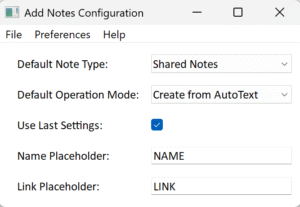
Configuration is accessed via the Options menu.
Default Note Type and Default Operation Mode determine the initial settings when the plugin is run.
If Use Last Settings is ticked, the plugin updates these defaults when it exits, so that it restarts with the same settings as it closed. If unticked, the plugin always starts with the defined defaults.
Name Placeholder and Link Placeholder define the tokens (if any) that will be replaced in templates in Create from AutoText mode.
- Token names can include uppercases letters (A-Z), numbers and periods (.)
- Examples: “NAME”, “FULLNAME”, “RECORD.ID”, “PERSON.LINK”
- Use in templates as: {NAME}, {LINK}, etc.
- Empty token names disable replacement for that token type
The Options File menu allows you to:
- Reset All options to the plugin defaults (Shared Notes, Create from Existing, Use Last Settings, and empty token names)
- Save your changes
- Cancel your changes
The Help menu displays this Help or the plugin About information.
Keyboard Shortcuts
The plugin has been designed to make as many actions as possible available from the keyboard.
| Shortcut | Action |
| Ctrl+A | Select all items in the current list |
| DEL | Remove selected items from the list |
| Arrow Up/Down | Navigate up/down in the list |
| Ctrl+Click | Add/remove individual items from selection |
| Shift+Click | Select range of items |
| Enter or Space | Open View/Edit for single selected item (Notes/AutoText list only) |
| Shortcut | Action |
| Arrow Up/Down | Move focus to next node up/down (Use with Shift for range selection) |
| Home/End | Move to First/Last Node |
| Page Up/Page Down | Move focus one visible page up/down |
| Enter | Expand/collapse folder |
| Ctrl+Arrow Up/Down | Move focus without changing selection |
| Ctrl+Space | Toggle selection of focused node |
All menus can be accessed via the keyboard. Use ALT followed by the letter that is underlined in the menu option you require.
F1 anywhere will take you to the Quick Start Help page.
Refer to the Family Historian documentation
Help content on this page is owned and provided by colevalleygirl, the plugin's author, Calico Pie takes no responsibility for its content.