
This plugin assists in identifying Place records whose name has spelling mistakes or whose Lat/Longitude plot is in the wrong position.
As usual, this works best if Place names have a consistent comma-separated part format such as ‘Town, County, Country’ but it copes with any Place name structure.
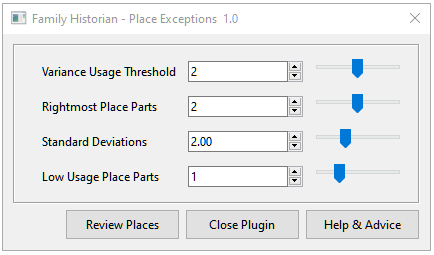
Several user options are presented and saved against each Project.
Their settings are explained later in the context of each type of exception reported.
The initial default settings are shown here.
To prevent any Place records from being reported add them to a Named List called Place Exceptions.
This allows confirmed false-positive cases to be excluded.
Use the Help & Advice button to display this help page.
Exception Report Types
Five types of abnormality are reported and are illustrated in the Result Set Exception Reports shown below.
- Variance
This tries to identify variant Place name spellings. If any Place name part spelling only occurs a few times, and a similar Place name part spelling occurs more often, then it is reported. The Variance Usage Threshold setting adjusts the sensitivity and 0 inhibits these reports. - Similarity
This reports pairs of Place names that only differ by the case of a letter or the number of spaces or commas in their name. - Deviation
This tries to identify Place plots that deviate from the majority of other plots in the same area determined by the number of Rightmost Place Parts and the Standard Deviations sensitivity settings. See the Plot Deviation Computations described below for details. Set the Rightmost Place Parts to 0 to inhibit these reports. - Plot Pair
Any area determined by the Low Usage Place Parts that has only two Place plots is reported. That may indicate a Place name spelling issue. - Singleton
Any area determined by the Low Usage Place Parts that has only one Place plot is reported. That may indicate a Place name spelling issue.
Plot Deviation Computations
This works on Place areas defined by the rightmost Place part, 2 rightmost Place parts, 3 rightmost Place parts, etc, up to the Rightmost Place Parts setting.
However, it starts in the smaller areas with the greater number of Place parts and works out to the rightmost Place part, i.e. It works from Towns through Counties out to Countries.
It only analyses areas with a cluster of at least 3 Place record plots.
If no deviant Place plots are found in an area cluster then those Place records are excluded from the reports. This should cope with countries that have clusters of plots in outlying areas such as Hawaii and Alaska in the USA.
If an area has at least 3 plots, the plugin calculates a central plot by taking the mean of all Latitude & Longitude values.
Then it determines the distance and bearing of each plot in that area from its central plot.
Using those distances, their statistical mean and standard deviation are computed.
Any plot is reported that is further from the central plot than the mean plus the number of Standard Deviations chosen.
Its actual number of standard deviations from the mean is listed as an assessment of the deviation.
In statistical terms, 95% of data is normally within 2 standard deviations of the mean.
Some areas are not even roughly circular but are elongated such as Chile and the Scandinavian countries.
So each area is split into 8 sectors extending from the central plot with bearings between N & NE, NE & E, E & SE, and so on.
The plots within each such sector are analyzed as above before the whole area and if no deviants those Place records are excluded from the reports.
Result Set Exception Reports
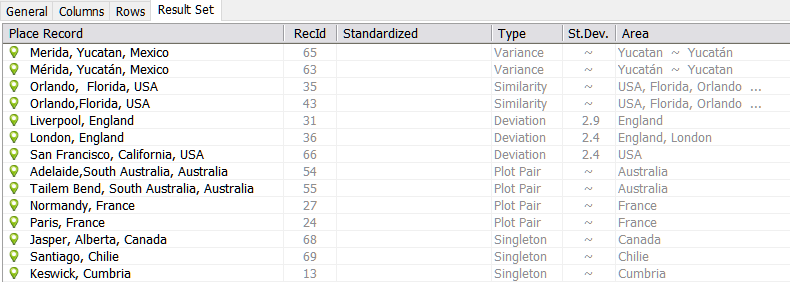
This illustrates the five types of abnormal Place exceptions reported.
The Variance reports identify the two variant name part spellings in the Area column.
The other reports identify the Area cluster with their name parts in reverse display order, possibly suffixed by sector bearings.
To prevent any false positive Place records from being reported, select them and use the cog Query Menu > Add Selected Cell Records to Named List… command and choose the Place Exceptions Named List.
Corrective & Diagnostic Techniques
In many cases, the only action needed is to correct the Place name spelling and perhaps geocode its new location.
Regarding Deviation reports, note the Std.Dev. values listed. You can click on the Std.Dev. column heading to get the largest at the top, which are the most deviant. Try increasing the user Standard Deviations setting to report only the most deviant plots.
If there are only 2 plots in outlying areas, such as Hawaii or Alaska in the USA, then they will probably produce Deviation reports. A workaround is to create & geocode a dummy 3rd Place record for Hawaii, USA or Alaska, USA. Then the cluster of 3 plots will be enough to avoid them being reported and is perhaps better than adding both Deviation Place records to the Place Exceptions Named List.
One way to investigate a Deviation report is to first note the Area in the rightmost column, e.g. England, London.
Then use the Tools > Work with Data > Places… command and in the Place List dialogue tick Reverse Display Order.
Now click the lefthand Last column header to sort place names alphabetically.
Scroll down and select all the England, London entries (or whatever Area name applies to the deviant Place).
Click the View in Map > View in Map Window option and OK the warning message.
In the Map Window find and click the original deviant Place name to identify its plot position.
Clicking on the Part column headings to sort them may simplify finding the Place name.
Finally, correct the deviant Place plot as necessary or add the Place record to the Place Exceptions Named List.
Plugin Place Exceptions
Help content on this page is owned and provided by Mike Tate, the plugin's author, Calico Pie takes no responsibility for its content.