
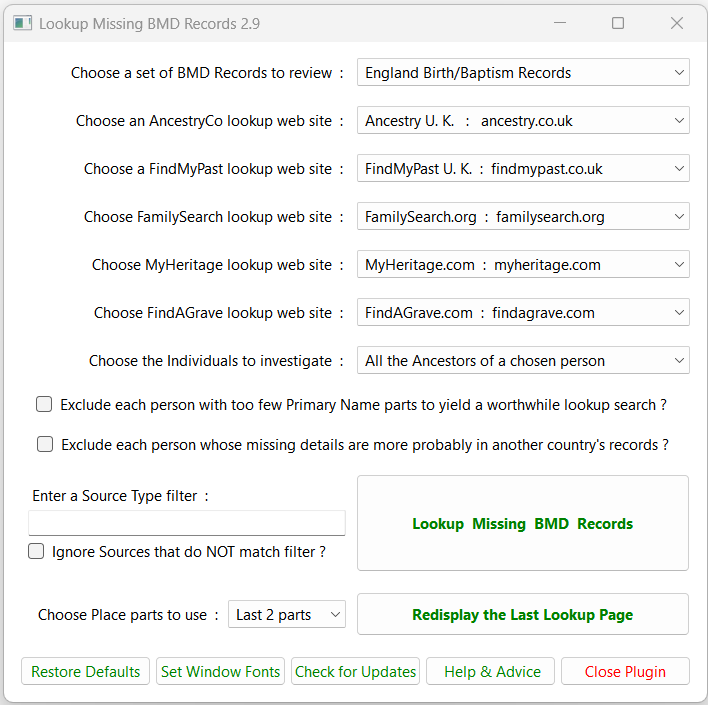
 This plugin offers ways of looking up missing Birth/Baptism, or Marriage, or Death/Burial (BMD) records online.
The BMD Records to review may be from England, Scotland, Wales, British Isles, Ireland, U.S.A., Canada, Australia, New Zealand, Germany, Denmark, Norway, Sweden, or Worldwide.
Choose lookup websites for which you have a subscription or offer a free account.
The FindAGrave website only applies to Death/Burial searches.
Each website offers various BMD Records for many countries but may be incomplete.
The Individuals to investigate can be all Ancestors or all Descendants or all Ancestors & Descendants or all Relations of one chosen person, or anyone chosen via the Select Records dialogue.
Tick Exclude each person with too few Primary Name parts… to skip any person where a lookup is likely to yield too many results.
Tick Exclude each person whose missing details are more probably in another country’s records to skip any such Event.
Enter a Source Type filter to inhibit any Event with a Quarter Date or post-1984 Month Date where its first Citation is a Source whose Generic Type contains the filter text. This allows UK GRO Index citations to inhibit the lookup for missing records. Leave this option blank to include such items in the lookup.
Tick Ignore Sources that do NOT match filter? to disregard any Citations with a Source whose Generic Type does NOT contain the filter text. This allows, for example, Census Citations to be disregarded when reviewing Birth/Baptism records.
Choose Place parts to use lets Last 2 parts or First 2 parts be extracted from Place names to provide County/State and Country filters.
See the Frequently Asked Questions for more advice about these and associated options.
The Lookup Missing BMD Records button searches the chosen Individuals for missing BMD Records during their lifetime, and presents a Lookup Web Page to initiate online searches, and a Result Set to quickly open the Property Box of each Individual.
The Redisplay the Last Lookup Page button presents the Lookup Web Page from the preceding use of the plugin.
Use the Restore Defaults button to reset the installation defaults for all GUI window options, positions, and sizes.
Use the Set Window Fonts button to Set Window Fonts and Colours and the Help & Advice button to display these online help pages.
Use the Check for Updates button to discover if there is a later plugin version in the Plugin Store.
Plugin Lookup Missing BMD Records
Help content on this page is owned and provided by Mike Tate, the plugin's author, Calico Pie takes no responsibility for its content.