
DO NOT USE RESTORE UNLESS YOU ARE COMFORTABLE WITH YOUR CURRENT DATA BEING OVERWRITTEN.
It is advisable to have independent Settings Folder backups, and either Windows Registry backups or suitable System Restore Points.
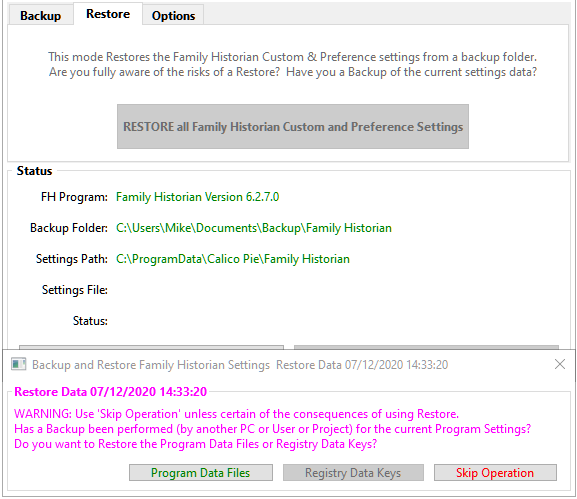
The RESTORE all Family Historian Custom and Preference Settings button offers the following features for each supported version of FH Program.
When run from the 64-bit Family Historian Version 8.0 then only that version is supported.
When run from any 32-bit Family Historian Version then it supports Family Historian Version 7.0, Family Historian Version 6.2, Family Historian Demo 3.0, etc.
- Within the Backup Folder it expects a sub-folder with the same name as the righthand Settings Path folder, which for a standard installation will simply be Family Historian, and that holds all the saved settings.
- RESTORE does much the same as BACKUP for the reverse direction, but the Tutorial Files and Program Data Files and Registry Data Keys are selected individually. The Registry Data Keys button is disabled unless the Options tab Allow Restore Registry Data option is ticked.
- If any Settings File exists in a Settings Path folder, but not in the Backup Folder, then the plugin offers to delete it from the Settings Path folder.
- If any Settings File in a Settings Path folder is newer than the file being restored from the Backup Folder, then the plugin asks what to do:
Copy Old Backup File or Keep New Program File. - The Registry Data Keys button restores all the relevant Preference settings stored in the Windows Registry providing Family Historian is closed. Take care to follow the Restore Registry Data Keys instructions and close Family Historian before continuing. This button also restores some Settings Files that Family Historian saves as it closes.
See the Frequently Asked Questions for more technical details.
Return to the Backup and Restore Family Historian Settings main help page.
Plugin Backup and Restore Family Historian Settings
Help content on this page is owned and provided by Mike Tate, the plugin's author, Calico Pie takes no responsibility for its content.