
Most of the data is common to all three types of index entries. The section Event Specific Details below documents the details which are specific to Births and Deaths. Thumbnails of the three screens are shown here; click a thumbnail to open the full size image in a new tab.


As data is keyed in the sections described below the Citation panel is updated to show the data that will be stored in the Where Within and the Citation Specific Text from Source fields.
Registration Details
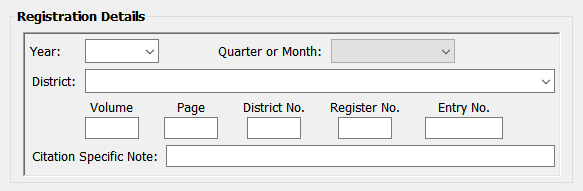
Year
The drop down has the most likely range of years for the event as estimated by Family Historian. If the year is not in the list it can be keyed. Where the event already exists and has a date the year will be pre-selected.
Quarter or Month
The drop down has, in addition to the quarters which are given on the GRO website, months. These are given for later events on sites such as FindMyPast and Ancestry.
Quarters can be selected by keying 1, 2, 3 or 4.
District
The full district name (normally District name, County, Country) should be entered as this will be used as the place if the plugin creates the event. If the option Only first field of District Name in Citation Text is enabled only the text up to the first comma is included in the Where Within field of the citation.
The drop down is populated with all the Places from the current project to allow existing districts to be quickly entered. Key the beginning of the name and either key down arrow or click the drop down arrow.
Tip: The counties for registration districts can be found on the UK BMD website here: https://www.ukbmd.org.uk/reg/districts/index.html
Volume, Page, District No., Register No. and Entry No.
These are the references which may be found when looking up GRO index entries. The plugin requires at least two of these fields to be completed.
Keying Ctrl Tab in any of these fields will jump to the first field in the Name panel.
Citation Specific Note
This field is optional. Anything entered here will be stored in the Note field of the citation.
Name(s)
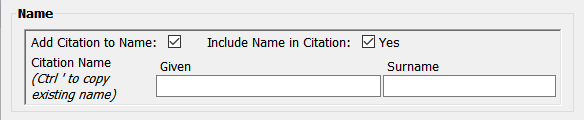
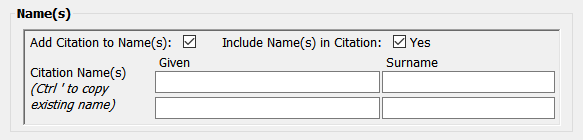
Add Citation to Name(s)
If this is enabled, in addition to adding the citation to the event, the citation will also be added to the individual’s name (both individuals’ names for a marriage citation). It requires the name to be included in the citation. An error will be given if it is enabled and the name(s) are not entered.
The default value of this option can be changed in Settings.
Include Name in Citation
This has three settings: ‘Yes’, ‘Only if adding citation to name’ and ‘No’. It cannot be set to ‘No’ if Add Citation to Name(s) is enabled. An error will be given if it is ‘Yes’ and the name(s) are not entered. The name(s) will be added to the citation in the citation specific Text from Source.
The default value of this option can be changed in Settings.
Citation Name(s)
On each of the fields keying CTRL ‘ (single quote) will insert the given or surname in to the field which can then amended if needed (e.g. the individual has two given names but the GRO index entry only has an initial for the second name). Holding the mouse over the fields will give a tool tip showing the name that would be inserted. The case used to enter the names does not matter; they will formatted in the citation as specified in the Format of Names setting.
Names do not need to be entered if Include Name in Citation is ‘No’.
Event Specific Details
Births

Mother’s Maiden Name
If the Mother’s Maiden Name is entered it will be added to the citation specific Text from Source using the label specified in the settings. CTRL ‘ (single quote) can also be used to insert the name.
Add Citation to Mother’s Name
If this is enabled the citation will be added to the Name in the mother’s individual record. If there is no mother, or the name is different, the mother’s record will be added or updated.
Deaths

Age and Date of Birth or birth year
Either of these may be entered (but not both). The date of birth can be entered in any format recognised by Family Historian. It also accepts year only or month and year. If neither of these is entered a warning message will be given
Citation
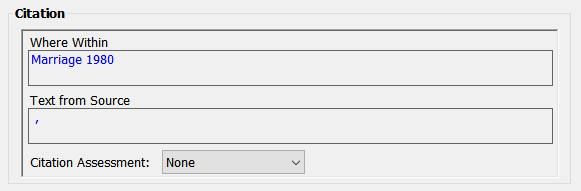
Where Within and Text From Source
These are automatically updated as data is keyed and give a preview of the data which will be recorded in the citation.
Citation Assessment
A citation assessment may be selected if required. The default value of this option can be changed in Settings.
Help content on this page is owned and provided by John Elvin, the plugin's author, Calico Pie takes no responsibility for its content.