
Where the data entered for a citation conflicts with the existing data, one or more of the dialogs below may appear for the user to confirm the action to be taken.
Cancelling on any of these dialogs will return to the main data entry screen.
Event Detail Changes
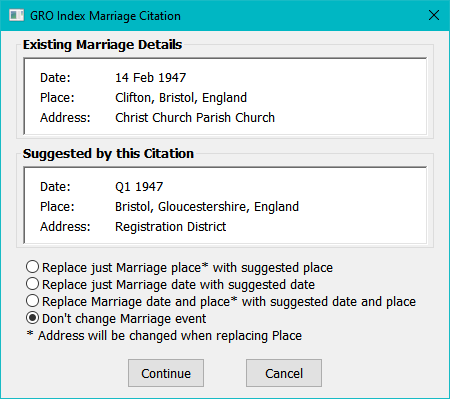
This dialog only appears when the event already exists and the Date, the Place or both are different.
If just one of Date or Place is different some of the options will be disabled.
Note that if the event Place is updated the event Address will be set to “Registration District”. if this is not appropriate to just change the date or the final option not to make any change and then change the Place via Family Historian as normal.
The dialog is the same for all three events with just changes to the labels.
Multiple Names
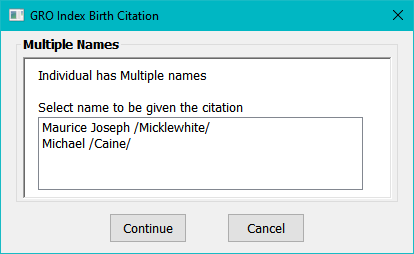
If Add Citation to Name is enabled and the an individual has an alternative name(s), a prompt is given for the name. The citation will be added to the selected name.
This dialog may also appear for a birth citation where Add Citation to Mother’s Name is enabled. If the mother’s record already exists and she has multiple names the name to be given the citation must be selected.
Change Name
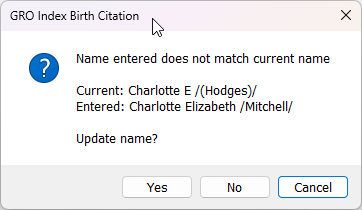
If Add Citation to Name is enabled and the name entered does not match the existing name this message will appear. Select whether the name is to be updated.
Adding a Mother (Birth citations)
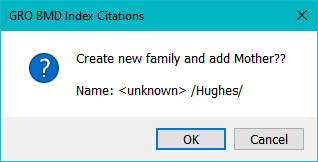
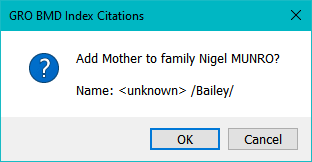
If Add Citation to Name is enabled and the mother’s record does not exist, one of these two messages will appear depending on whether the family record exists.
The given name to be used when creating the mother’s record is specified in the settings.
Change Mother’s Name (Birth Citations)
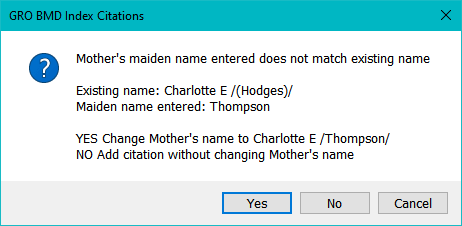
If Add Citation to Name is enabled and the mother’s maiden name entered does match the surname of the mother this message will appear. (In this example the mother had been added to the project with the husband’s surname in brackets).
An example of when the No option might be used is if the GRO index has a misspelt mother’s name.
Death Age
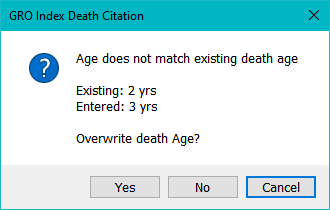
If there is already a Death event recorded and the age entered in the citation does not match the recorded age, this message will be given. Select whether the age is to be changed.
Date of Birth (Death Citation)
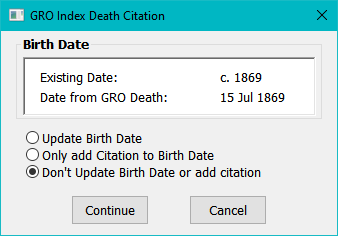
This dialog will appear if either the age at death or date of birth is entered and the birth year calculated from the age, or the entered date of birth, does not match the existing birth date.
The first option will update the birth date and add the citation to the birth event. The second only adds the citation to the birth event.
Note that whichever of the three options is taken, the entered date of birth will still be included in the Citation Specific Text from Source.
Help content on this page is owned and provided by John Elvin, the plugin's author, Calico Pie takes no responsibility for its content.