
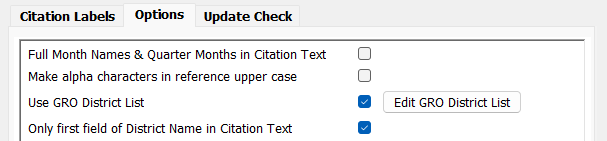
To ensure the GRO District names are entered consistently, the plugin has an option to maintain a list of the GRO District names. The option is enabled by selecting Use GRO District List in Settings Options. When selected a button is added to open the dialog to maintain the list.
When the option is enabled the Registration Details section of the data entry screens is modified to include a button to directly open the dialog to maintain the list without having to go via settings.
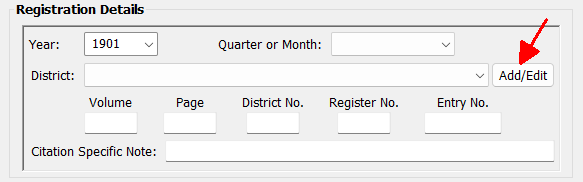
Districts can only be selected from the list. Also if the years the district was active are added (see below) these will be shown in square brackets after the name and the year will be validated against the details recorded for the selected district.
GRO District Maintenance
Add GRO district
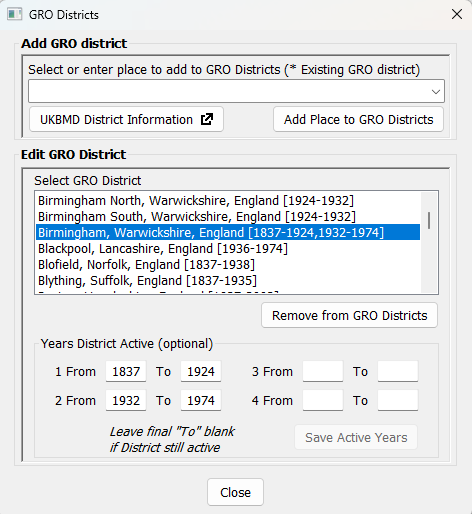
The drop down list has all of the Places within the project. Places which have already been added to the list of GRO Districts will have an asterisk beside the name. To add an existing Place to the GRO Districts list select it from the list or enter a new Place then click Add Place to GRO Districts. If a new Place is entered it will be added to the Places within the project. The Place will be added to the list of GRO Districts in the second list box and selected. Note that the GRO District names will be used for the Place when adding the Birth, Marriage or Death facts.
UKBMD District Information
This button opens the page on the UKBMD website listing all the Registration Districts that have existed since 1837. This is particularly useful if the years the District was active are to be used. It also shows the Registration Counties (and the periods to which they apply) to assist with correctly creating the full GRO District Place name.
Edit GRO District
Select a GRO District from the list to either remove it or add/amend the years the district was active.
Remove from GRO Districts
This removes the selected district from the list. Note that the plugin does not immediately remove the Place from the project; Family Historian will do that if the Place name is not used in any facts.
Years District Active
If the years active is to be used they must be entered in ascending order. The final period should have the From year only entered if the District is still active. Click Save Active Years to save the changes; the active years will shown in square brackets both in the list of GRO Districts on this screen and on the main data entry screen.
Upon closing this screen, if it was opened from the citation data entry screen, and a district is selected, the district will be automatically selected in the data entry screen.
Plugin GRO BMD Index Citations
Help content on this page is owned and provided by John Elvin, the plugin's author, Calico Pie takes no responsibility for its content.