
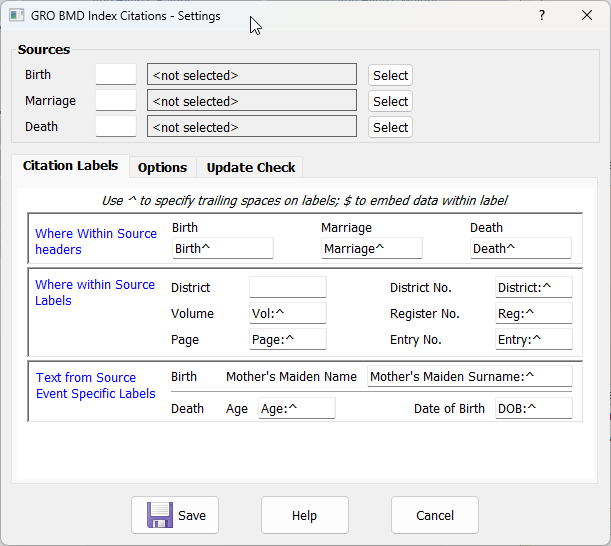
Sources
For each event either enter the source’s record id or use the Select button to pick the source from the Family Historian Select Source Record dialog.
Templated sources are not supported at the present time.
The same source can be selected for two or all three events.
Citation Labels
The citation labels specify the labels which will be added to the data when it is included in the citation. Labels will not appear in the citation for fields which are blank in the data entry screen.
Spaces are not automatically added between the label and it’s associated data, use circumflex (^) where spaces are required as shown in the above screenshot. A single space is normally inserted between a data item and the following label.
The label can also be wrapped around the data item by using $. For example (Mother:^$).
Where Within Source headers
These labels will be the beginning of the Where within Source. If separate sources are being used and the sources have ‘Birth’, ‘Marriage’ and ‘Death’ in their names these labels could be be removed as they would be redundant.
Where within Source Labels
These labels are used for the District Name and the five reference fields which form part of the Where within Source. These are the exception to the space between items in that if the label begins with / or – the space is suppressed (example changing the Page label to just / would give a reference like Vol: 10A/143).
Text from Source Event Specific Labels
These labels specify how the extra data items which may be entered for Births and Deaths will appear in the Citation Specific Text from Source. They will be after the names if they are included in the citation.
Options
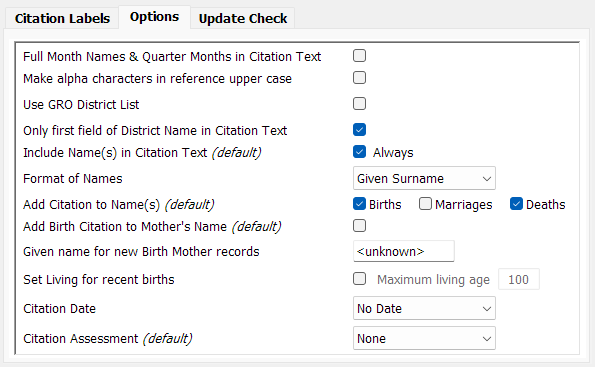
Full Month Names & Quarter Months in Citation Text
This specifies how the quarter or month will appear in the Where within Source.
Disabled (default) they will be truncated. Quarters will appear as Q1, Q2, Q3 and Q4; months as Jan, Feb, Mar etc.
Enabled they will be in full. Quarters as Q1 Jan-Feb-Mar, Q2 Apr-May-Jun etc.; months as January, February, March etc.
Make alpha characters in reference upper case
This will make alpha characters entered in to the five reference fields (Volume, Page, District No., Register No. and Entry No.) upper case.
Use GRO District List
This enables the use of a list of GRO District names, ensuring that they are entered in a consistent manner. See GRO BMD Index Citations – GRO Districts.
Only first field of District Name in Citation Text
The District should be keyed in full (normally District, County, Country) as this will be used for the Place when Birth, Marriage or Death Events are created or updated. Enabling this option will still use the full place name for the events, but only up to the first comma will be used in the Where within Source.
Include Name(s) in Citation Text
This setting specifies the default for the option on the data entry screen, Include Name in Citation. It has three settings: ‘Yes’, ‘Only if adding citation to name’ and ‘Never’. It cannot be set to ‘Never’ if any of the Add Citation to Name(s) options are enabled. The default can be overridden while entering any citation.
Format of Names
This controls the order of the given names and surnames and whether how the surname is capitalised in the Citation Specific Text from Source. The options are:
-
- Surname, Given
- SURNAME, Given
- Given Surname
- Given SURNAME
This setting also controls the format of the mother’s maiden name which will be capitalised if either of options with capitalised surnames is selected.
Add Citation to Name(s)
These settings specify the default for the Add Citation to Name option on the data entry screen, one setting for each event. These cannot be enabled if Include Name(s) in Citation Text is set to Never. The default can be overridden while entering any citation.
Add Birth Citation to Mother’s Name
This setting specifies the default for the option Add Citation to Mother’s Name on the Birth data entry screen. The default can be overridden while entering any citation.
Given name for new birth Mother records
If the option Add Citation to Mother’s Name is enabled while entering a Birth citation and the current individual does not currently have a mother a new individual record will be added and linked to the current individual. The name of the individual added will be constructed from the Given name entered here and the Surname entered in the citation. This will also be used if the mother’s individual record existed but her name was blank.
Set Living for recent births
When enabled, the Living flag will be set when adding a Birth citation if the age of the individual will be less then the Maximum living age specified.
Citation Date
This specifies the Date which will be recorded in the citation (seen as Data Recorded, Entry Date when the citation is expanded in the individual/family All tab or the Citation List Pane). The options are:
-
- No Date
- Current date
- GRO Index Reg. Date (the quarter/month and year entered for the citation)
Citation Assessment
This specifies the default for the corresponding option on the data entry screen. the options are:
-
- None
- Unreliable
- Questionable
- Secondary Evidence
- Primary Evidence
The default can be overridden while entering any citation.
Update Check
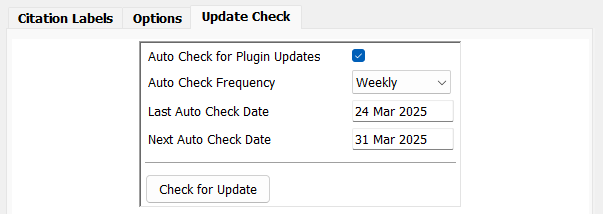
Auto Check for Plugin Updates
When enabled the plugin will check for an updated version in the plugin store at the frequency specified. The check is performed as the plugin starts, and if successful schedules the next automatic check. If the check fails (e.g. Internet not available) an option if given to defer the check until the following day.
Auto Check Frequency
Select how frequently the check for an updated version is to be performed. The options are Daily, Weekly, Fortnightly or Four Weekly. As the options are selected the Next Auto Check Date will be updated based on the date of the Last Auto Check Date.
Last Auto Check Date
This shows the date of the last successful automatic check.
Next Auto Check Date
This shows the date upon which the next automatic check will be performed. When the Auto Check Frequency is changed this will recalculated from the last auto check date and the selected frequency. If this results in a date which is before the current date it is repeatedly increased until a date which is equal or later than the current date.
Check for Update
Clicking this button will perform an immediate check against the plugin store for an updated version of the plugin. It does not change the Last Auto Check Date.
Help content on this page is owned and provided by John Elvin, the plugin's author, Calico Pie takes no responsibility for its content.