
The plugin attempts to find likely duplicated Individual Records by scoring points for matching Record data and displays the best candidate pairs in a Result Set.
The user interface allows a subset of Individual Records to be chosen, both by choosing a Date threshold for their Updated date value, and by selecting a specific set of Individuals. This allows only recently Updated records, or for example, similar Surname Records to be checked. If any records have no Updated date they will be considered later than the Date threshold.
The Date threshold for the Updated date can be the plugin last run Date or a user-adjustable Date.
Each included Individual Record is checked against every database Individual Record. So only excluded Individual Record versus excluded Individual Record checks are skipped.
Any pairs of Individual Records in the Non-Duplicates List are excluded, as explained under Omit Non-Duplicates Tab.
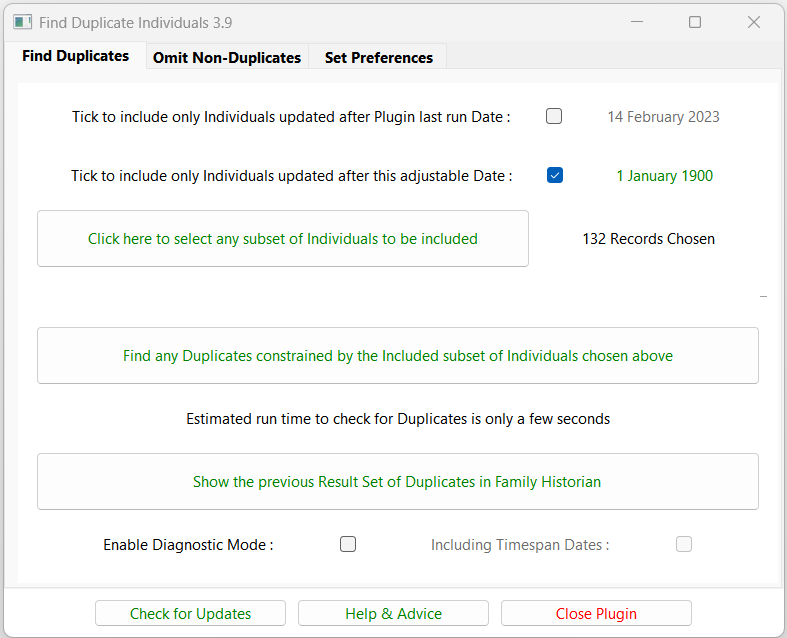
The Find any Duplicates… button will assess the records using several strategies:
- Names Assessment compares Primary Name and Alternate Name fields
- Event Assessment compares key Events by Date and Place Name
- Date Chronology validates the chronological order of many key Events
- Family & Gender assesses close family relationships and gender
On completion, the candidate duplicate Individual Record pairs are presented in a Result Set.
The Enable Diagnostic Mode lists more Individual Records and more Column Data, optionally Including Timespan Dates as described under Date Chronology and consequentially runs much slower.
The Result Set is shown again, without running assessments, by using the Show the previous Result Set… button.
Return to the Find Duplicate Individuals main help page.
Plugin Find Duplicate Individuals
Help content on this page is owned and provided by Mike Tate, the plugin's author, Calico Pie takes no responsibility for its content.